Social Media Time Zones Scheduling: How to Post for Global Audiences Without Losing Sleep
Learn how to schedule social posts for EU, US, and APAC audiences, handle daylight-saving shifts, and automate timezone-aware queues. A practical guide for small teams going global.

By AgentMio team Published · 8 min read
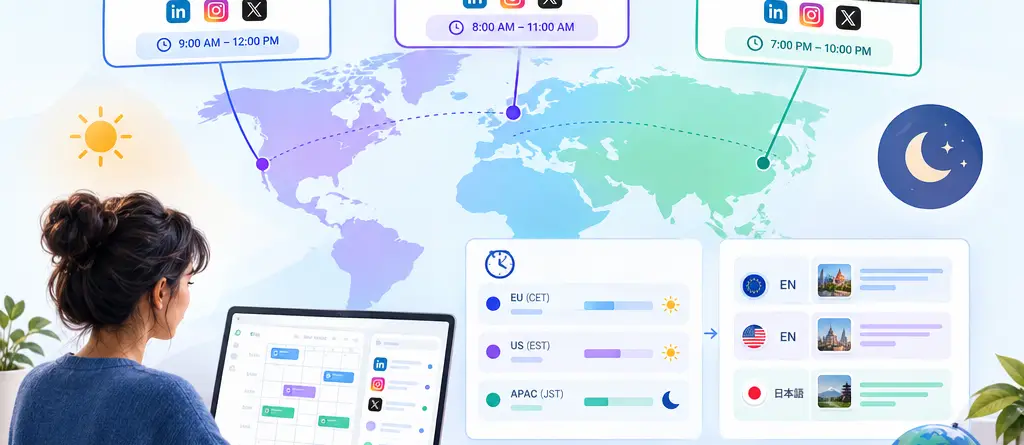
Social media time zones scheduling means publishing content so each regional audience sees it during their own peak engagement hours, not yours. For a brand spanning the EU, US, and APAC, this usually means running three to four separate posting windows per platform, adjusted twice a year for daylight saving shifts. The fix is a timezone-aware queue — either a shared spreadsheet with UTC conversions or a scheduler that handles the math for you.
If your small team has started serving customers outside your home market, you've probably noticed that a post timed perfectly for New York lands at 3 a.m. in Singapore. That's not a content problem — it's a scheduling problem, and it's fixable with a system instead of guesswork.
Why does posting time matter for international audiences?
Posting time matters because social platforms still reward early engagement — the likes, comments, and shares a post gets in its first hour influence how widely it's shown afterward. A global social media posting schedule that ignores local morning and evening habits means your best content launches into an empty room for a big chunk of your audience.
This is especially costly for small teams, because you likely don't have the headcount to manually babysit three regional launches a day. Getting the timing right once, through a repeatable system, saves you from redoing this work every single week.
What's the real problem with managing multiple time zones manually?
The real problem is cognitive load, not the math itself. Converting UTC to EU, US, and APAC times for every post, every platform, and every daylight saving change adds up to hours of error-prone work each week.
Daylight saving mismatches: the EU and US don't shift their clocks on the same dates, which temporarily throws off any fixed-time schedule.
Platform-specific peak windows: LinkedIn, Instagram, and X each have slightly different "best time to post" patterns per region.
Language and cultural timing: a Spanish-language post aimed at Latin America needs a different window than one aimed at Spain, even in the same rough time zone.
Manual spreadsheet drift: once someone forgets to update a conversion after a clock change, every post that week goes out at the wrong local hour.
What is a timezone-aware posting strategy?
A timezone-aware posting strategy is a repeatable system that converts your content calendar into local posting times for each target region automatically, rather than recalculating by hand every week. It combines three things: defined regional posting windows, a single source-of-truth calendar in UTC, and a tool or process that applies the conversion consistently.
The goal isn't to post constantly — it's to hit two or three high-engagement windows per region per platform, in the language and tone that region expects.
How do you build a posting schedule for EU, US, and APAC audiences?
Here's a prerequisite checklist before you start, followed by the exact steps to build your schedule.
A content calendar tool (spreadsheet or scheduler) that can store times in UTC
A list of your top 2-3 regions and their primary time zones
30-60 minutes to map out posting windows per platform
Basic familiarity with your audience's local working/scrolling hours (morning commute, lunch break, evening wind-down)
Step 1: Map your audience to specific time zones, not just "regions"
"EU" isn't one time zone — Dublin, Berlin, and Athens span three different offsets. Pick a reference city per region instead: Central European Time (Berlin) for the EU, Eastern Time (New York) for the US, and Singapore Time for APAC. This gives you three fixed anchor points instead of a vague regional guess, which is the foundation of any accurate global social media posting schedule.
Step 2: Identify 2-3 peak windows per platform, per region
Most audiences check social media during a morning commute, a midday break, and an evening wind-down. For a B2B audience, that's often 8-9 a.m., 12-1 p.m., and 5-6 p.m. local time; for consumer audiences, evenings tend to perform better, often 7-9 p.m. local time. Set these windows per platform since LinkedIn skews toward work hours while Instagram and TikTok skew toward evenings and weekends.
Step 3: Convert every window to UTC and store it as your master calendar
Keep one master calendar in UTC and let regional times be a calculated display, not a manually typed value. This is the single biggest fix for daylight saving errors, because UTC itself doesn't shift — only the local offset from UTC changes twice a year. If your tool supports this natively, you only ever edit one row instead of three.
Step 4: Build a repeatable weekly queue
Once your windows are set, batch a week of content at once and slot each post into its matching regional window. For three regions and three platforms, that's potentially nine distinct time slots per day — manageable only if the queue is templated, not rebuilt from scratch each Monday.
Step 5: Adjust for daylight saving twice a year — on a set date
The EU typically shifts clocks in late March and late October; the US shifts about one to two weeks apart from the EU dates, which creates a short window each spring and fall when the offset between regions temporarily changes. Put a recurring calendar reminder on your own team's calendar for both shift dates so you update local-time displays before, not after, the change happens. APAC regions that don't observe daylight saving (like Singapore) stay fixed, which makes them a useful stable anchor during these transition weeks.
Worked example: a brand posting across EU, US, and APAC
Here's how a worked example might look for a small consumer brand posting on Instagram and LinkedIn, using Berlin, New York, and Singapore as regional anchors.
RegionReference cityInstagram window (local)LinkedIn window (local)EUBerlin (CET/CEST)7:30-8:30 p.m.8:00-9:00 a.m.USNew York (ET/EDT)7:00-8:00 p.m.8:30-9:30 a.m.APACSingapore (SGT)8:00-9:00 p.m.9:00-10:00 a.m.
In UTC, these three Instagram windows land at roughly 17:30-18:30, 23:00-00:00, and 12:00-13:00 — three distinct slots spread across a 24-hour period. Storing the schedule this way, in UTC, means when the EU shifts to daylight saving in late March, only the Berlin display time moves; the US and Singapore local times (and the underlying UTC slot) don't need to be touched until their own shift dates arrive.
How do you align posting times with language-specific communities?
You align posting times with language communities by scheduling the translated version of a post for that community's local peak window, not the original language's window. A French-language post for Quebec, for example, needs an Eastern Time window, while a French-language post for France needs a Central European Time window — same language, different schedule entirely.
This is where multi-language scheduling gets genuinely harder to do by hand, because you're no longer managing three regions — you're managing three regions multiplied by however many languages you publish in. A tool built for multi-language, multi-brand scheduling removes this multiplication problem by letting you tag content with both a language and a region, then applying the right local time automatically.
Common mistakes to avoid
Using one global posting time for everyone: this guarantees at least one region gets content at an inconvenient hour.
Forgetting that daylight saving dates differ between the EU and US: this creates a 1-2 week window of inaccurate offsets every spring and fall.
Matching language to the wrong region: posting Spanish-language content on a Spain schedule when your audience is in Mexico.
Manually recalculating times every week: small errors compound fast across multiple platforms and regions.
Ignoring platform-specific peak hours: treating Instagram and LinkedIn as if they have identical audience behavior.
Quick checklist: timezone-aware scheduling
Pick one reference city per target region
Define 2-3 peak windows per platform, per region
Store your master calendar in UTC
Set calendar reminders for daylight saving shift dates
Tag content by both language and region
Review engagement data quarterly and adjust windows if needed
How can you automate a timezone-aware posting queue?
You automate a timezone-aware posting queue by using a scheduler that stores posts in UTC internally and displays or publishes them at the correct local time for each target audience, removing the need for manual recalculation. A timezone social media scheduler should let you set a region once per post or per queue, then handle daylight saving transitions without you touching individual post times.
This is exactly the gap AgentMio was built to close. AgentMio is an AI-powered social media management platform that lets small teams and boutique agencies manage multiple brands, platforms, and languages from one centralized dashboard, with AI agents that draft, schedule, and queue content across regional posting windows so you approve once instead of recalculating times by hand every week.
For a team serving EU, US, and APAC audiences in two or three languages, that difference is the gap between a few focused approvals a week and a running spreadsheet nobody fully trusts.
FAQ
What time zone should I use as my default for scheduling?
Use UTC (Coordinated Universal Time) as your internal default, since it never shifts for daylight saving and gives every regional team a consistent reference point. Display local times for each region as a conversion from that single UTC value, rather than typing separate local times by hand for every post.
How often do I need to update my schedule for daylight saving time?
Twice a year — once in spring and once in fall — and only for regions that actually observe it. The EU and US shift on different dates, typically one to two weeks apart, so set two separate reminders rather than assuming both regions change together.
Is there a single best time to post for a global audience?
No single time works for a truly global audience, because "best time" is tied to local waking hours, commute patterns, and platform habits. Instead, aim for 2-3 regional windows per platform based on where your audience actually lives, rather than searching for one universal hour.
Do different social platforms need different regional posting times?
Yes. LinkedIn engagement tends to cluster around work hours (morning and midday), while Instagram and TikTok often perform better in evenings and on weekends. Build separate windows per platform and per region instead of reusing one schedule across every channel.
How do I schedule content for the same language but different countries?
Treat language and region as two separate variables. A Spanish-language post for Spain needs a Central European Time window, while the same language aimed at Mexico needs a Central Time window — tag each post with both its language and its target region so the correct local time gets applied.
Ready to stop recalculating time zones by hand? Try AgentMio free and schedule across every region from one dashboard.